

We didn't write a pitch.
We built the demos.
Working builds for the way a commercial grounds operation actually runs: a console that knows where every truck and every crew member is, how long each site visit should take, and how many crew-hours it burned against the bid. Plus a client app your property managers will open every morning, and a commercial-first rebuild of hittlelandscape.com. All live right now. Open them on your phone.
Don't take our word for it. Try them.
Everything below is a working build seeded with a realistic day of Hittle's commercial operations: 96 crews, 340 people, four branch yards, a live clock. Nothing is a screenshot of a slide. Tap any frame and it opens the real thing.
All 312 of Hittle's vehicles, across four regional yards, on one console. Groundspeed watches the GPS feed and turns it into the number your ops team actually argues about: how long did we sit on that site, and how long did the estimate say? When a crew runs past its estimated duration — one truck or ninety, running at once — Groundspeed doesn't wait for the Friday recap. It flags it while the trailer is still on the property.
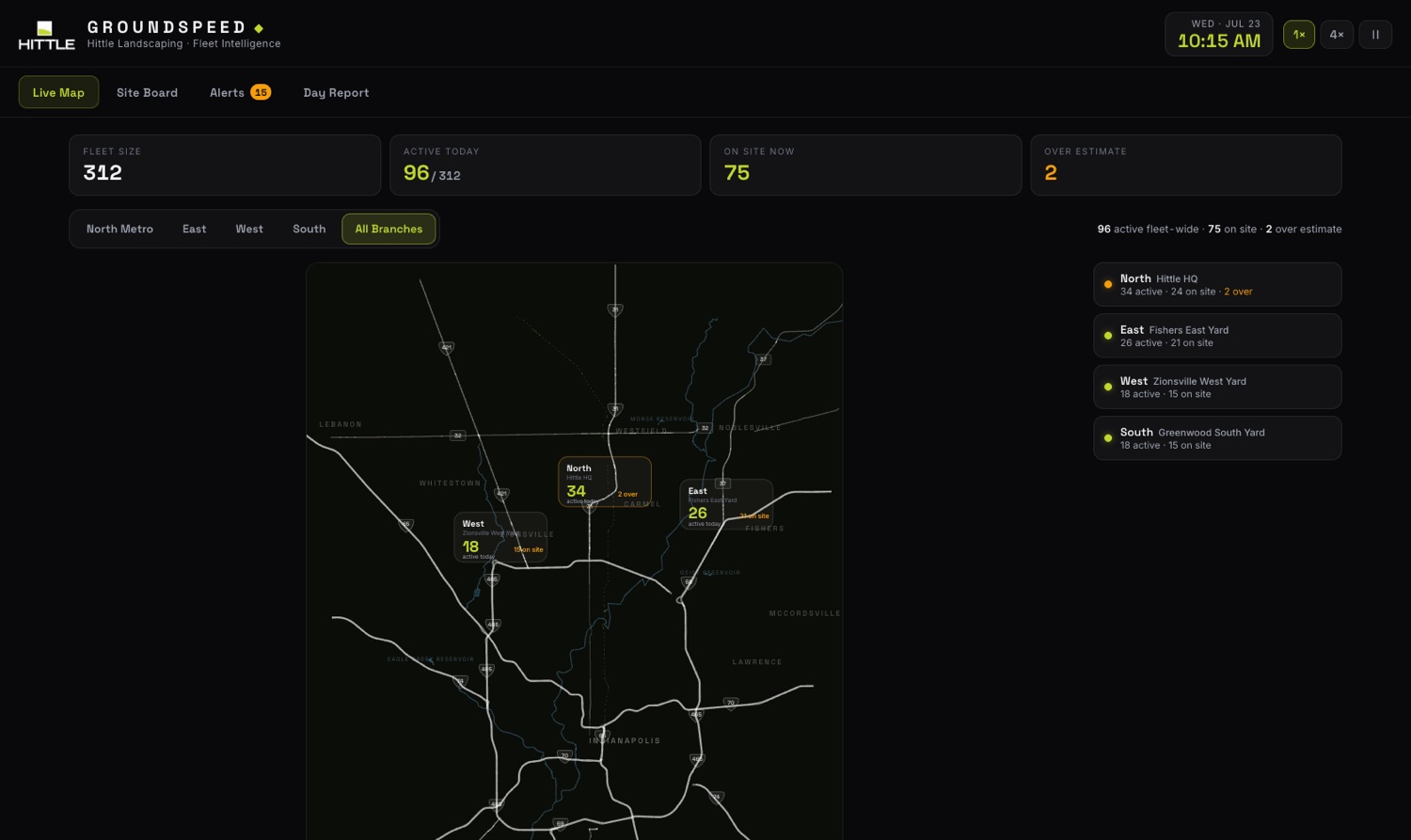
- IFleet-wide live map, on real roads. Actual Indianapolis-metro geography — real highways, real interchanges, real reservoirs — not a stylized mockup. Four regional yards on one console: zoom out to see every branch's load at a glance, zoom into a region to watch individual trucks move along the same roads your crews actually drive. Crews sharing a property cluster into a single badge instead of stacking labels.
- IISite timers vs. estimate. Every active truck ticks against its estimated duration — a searchable, sortable board across all 96 trucks working today, not just a glance at a handful.
- IIIOverage reporting, live. The moment any crew crosses its estimate, an alert fires with minutes-over counting up — plus arrival, departure, and long-idle events across the whole fleet, with acknowledgements.
- IVDrive time vs. site time. A day report computed from the same feed: splits of site, drive, and yard minutes by branch and crew type, an estimate-accuracy leaderboard, fleet-wide utilization.
- VCrew tracking, built in. A new Crews tab tracks the people, not just the trucks: who's on the clock, punches, timesheets, and crew-hours against the bid. Details in the next section.
- VIProduction pass. The real build plugs into your actual GPS hardware (Samsara, Verizon Connect, or in-cab phones), draws geofences from true property boundaries, syncs estimates from your bid and job-costing system, and pushes alerts to text or Teams.
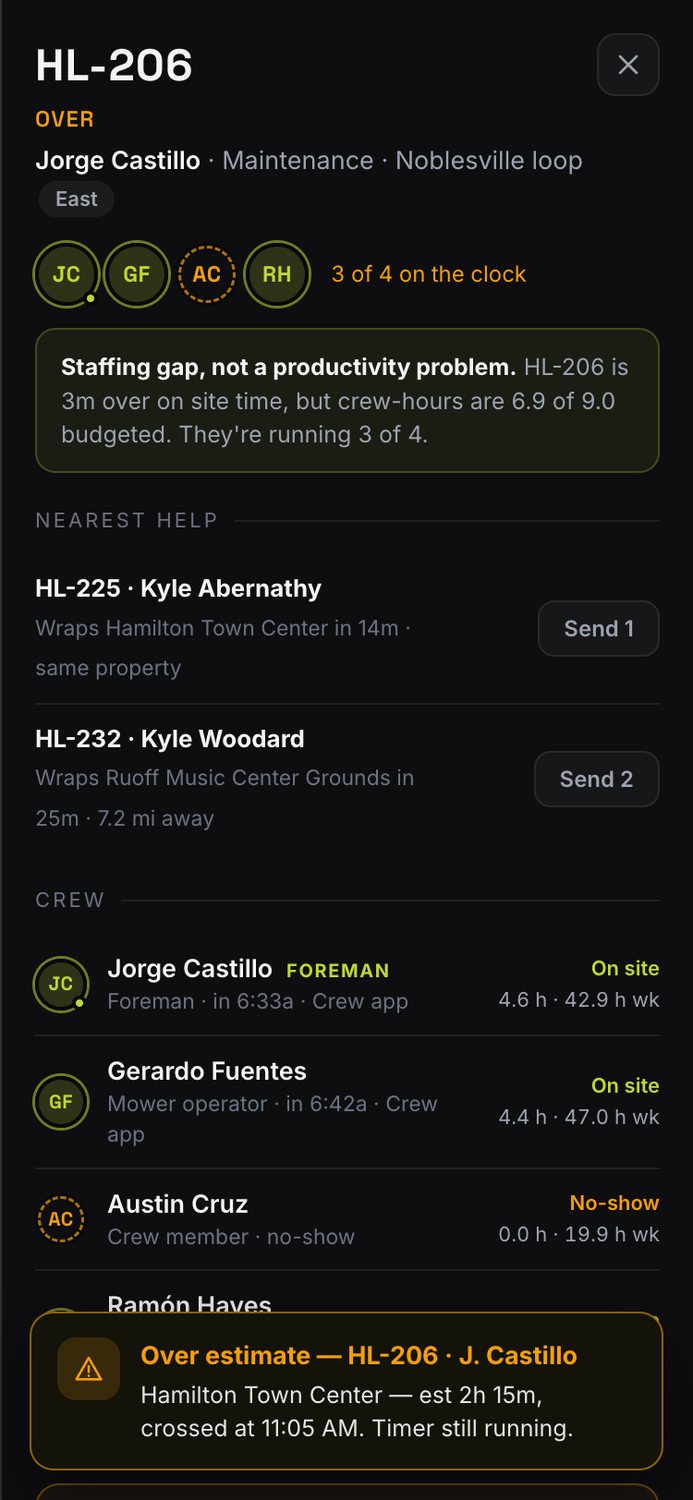
A truck on a map doesn't tell you who's on it. The Crews tab tracks all 340 people on 96 crews: punches captured automatically at the yard and property geofences, who's on site, driving or on lunch, and the number that decides margin on commercial work: crew-hours used against crew-hours bid. When a crew runs over, Groundspeed tells you whether it's a productivity problem or a staffing gap, and which nearby crew can send help.
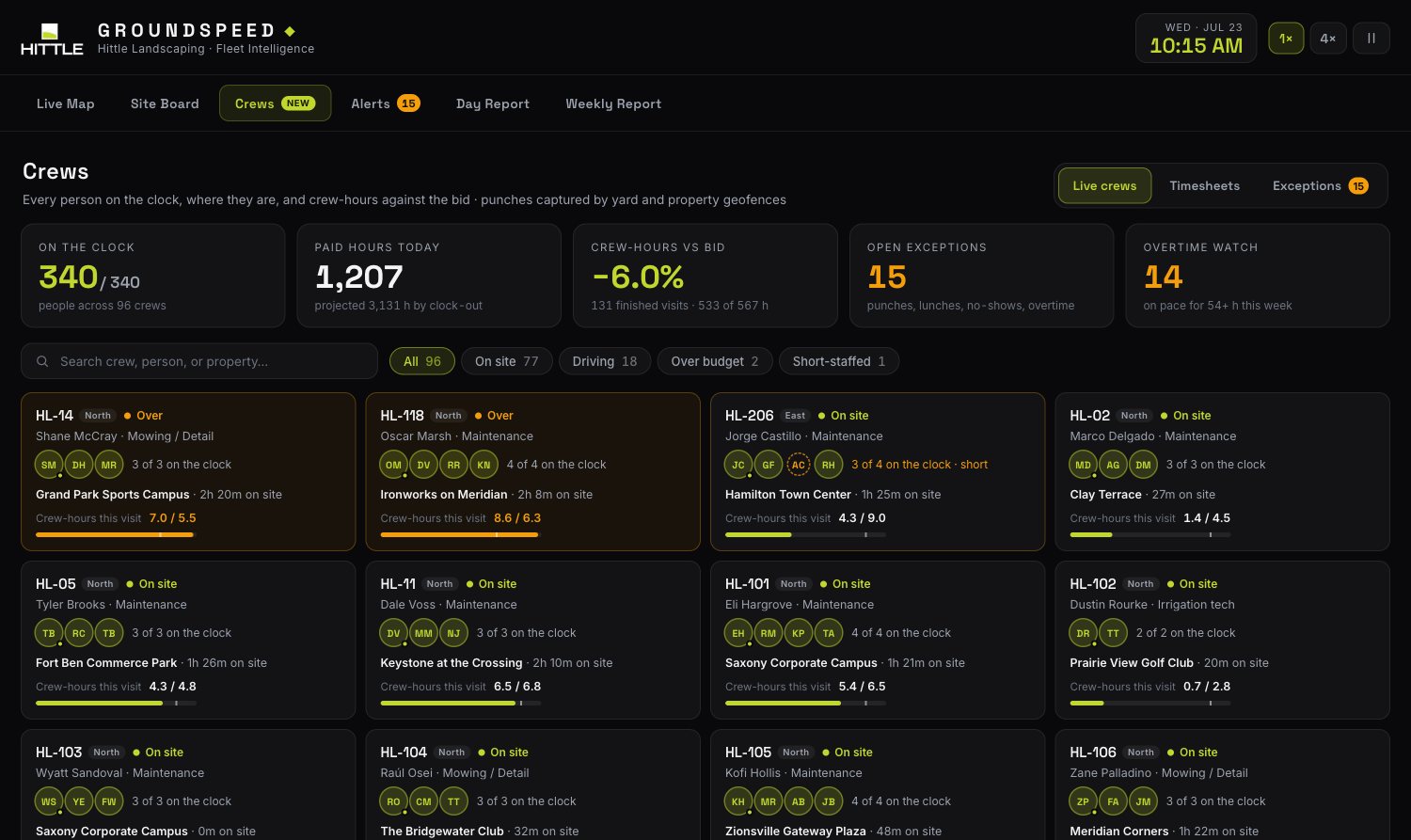
- IEvery person, live. Each crew shows who's on the clock, who's on site, driving or at lunch, and who never showed. Search by name, crew or property.
- IICrew-hours vs. bid. Every visit is budgeted as estimate × planned crew size. Groundspeed compares that to the people-minutes actually spent on site, visit by visit, crew by crew.
- IIIStaffing gap or slow crew? A crew that's a person short runs long on the clock but can still be under on crew-hours. Groundspeed says which one it is, so you don't chase the wrong problem.
- IVSend help. When a crew runs over, it lists the nearest crews in the same branch that are about to finish, with distance, and dispatches them in one tap.
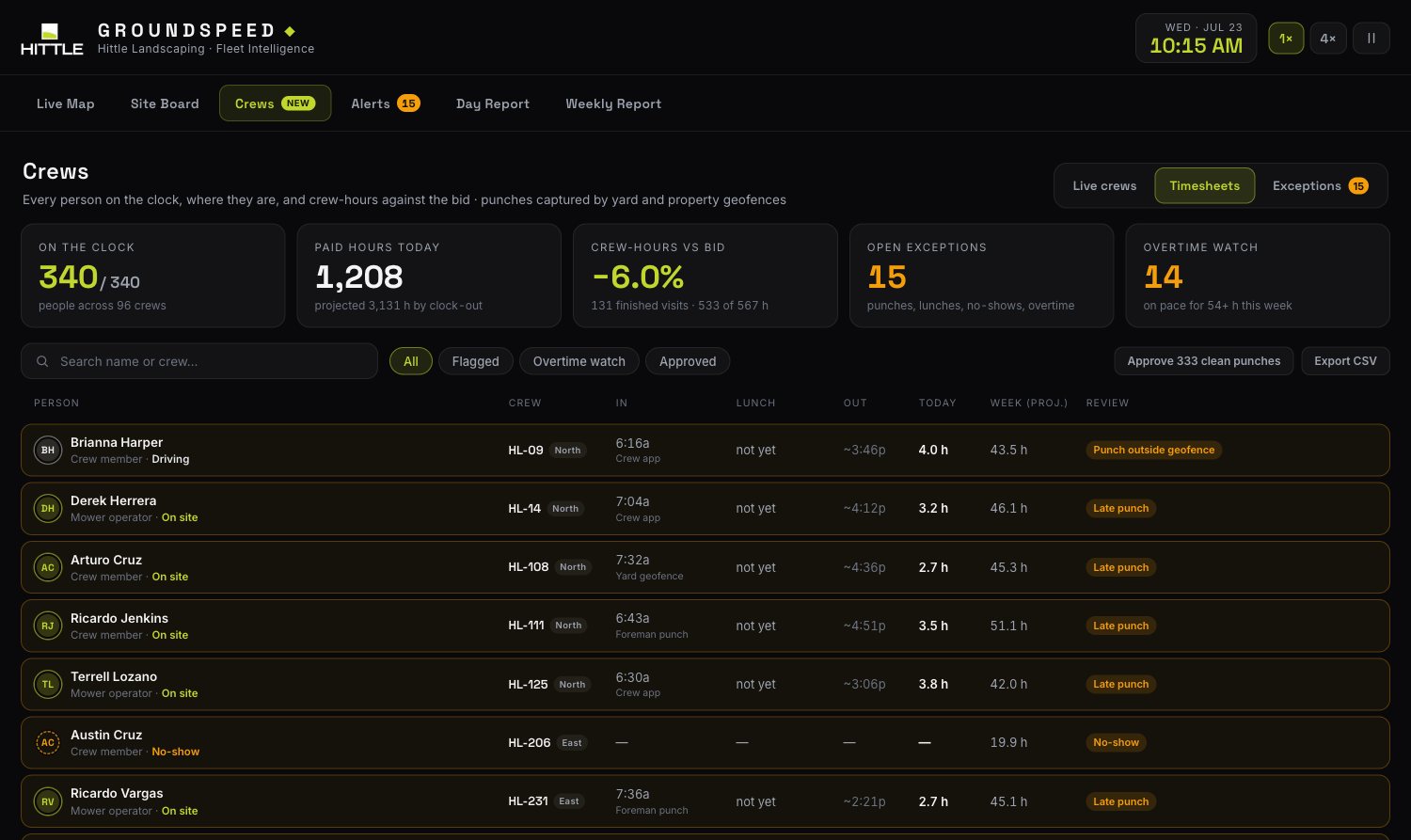
- VTimesheets that build themselves. Geofence punches, lunches and projected clock-outs roll into a timesheet for every person. Approve the clean ones in one click, export CSV for payroll, and see who is heading into overtime by Wednesday.
- VIExceptions, not paperwork. Late punches, punches from outside the yard, skipped lunches and no-shows surface on their own, each with a one-tap fix.
 Open crew tracking →
The same GPS feed, pointed at the client. Greenline gives every property manager their own Hittle app: this week's schedule, a live map of the crew heading their way with a real ETA, a chat line to their account manager, and photo-backed service reports with one-tap proposal approvals. In the demo you're Dana, the property manager at a Fishers corporate campus — and truck HL-07 is 23 minutes out.
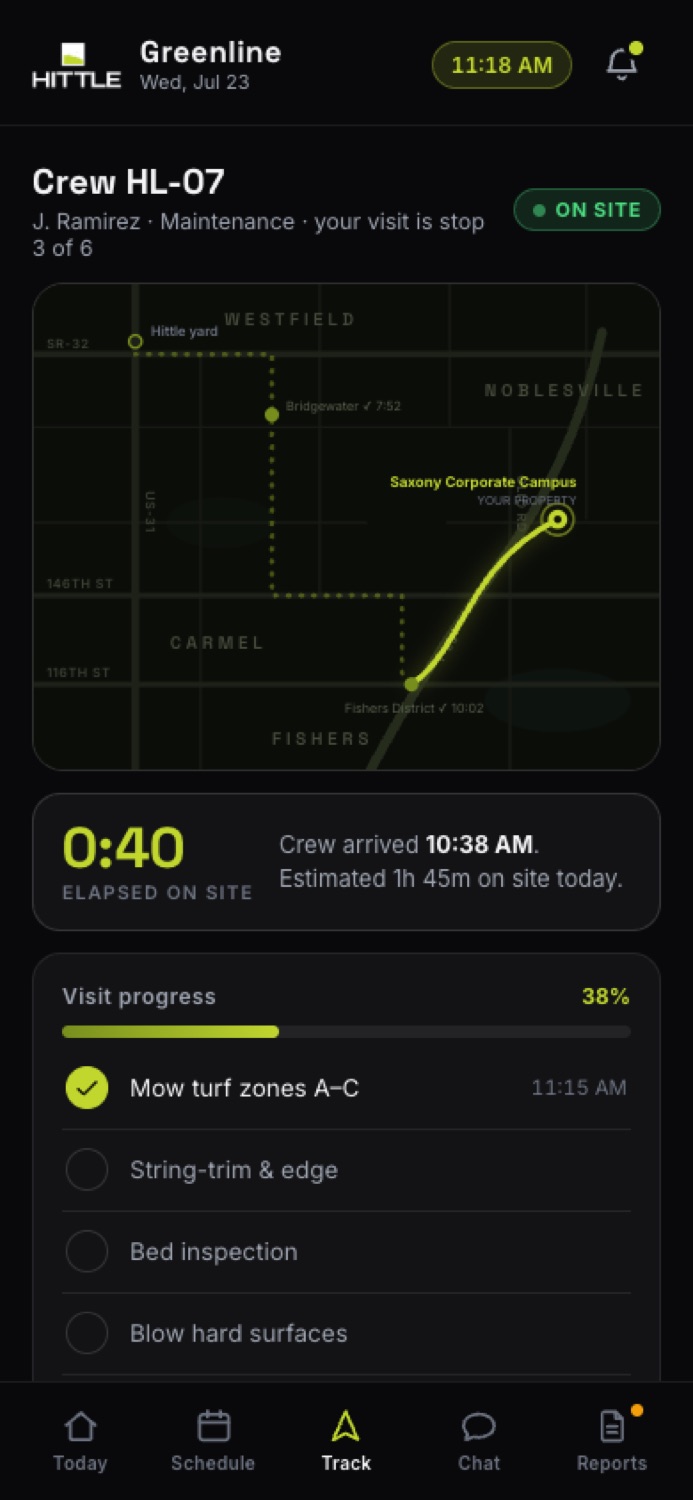
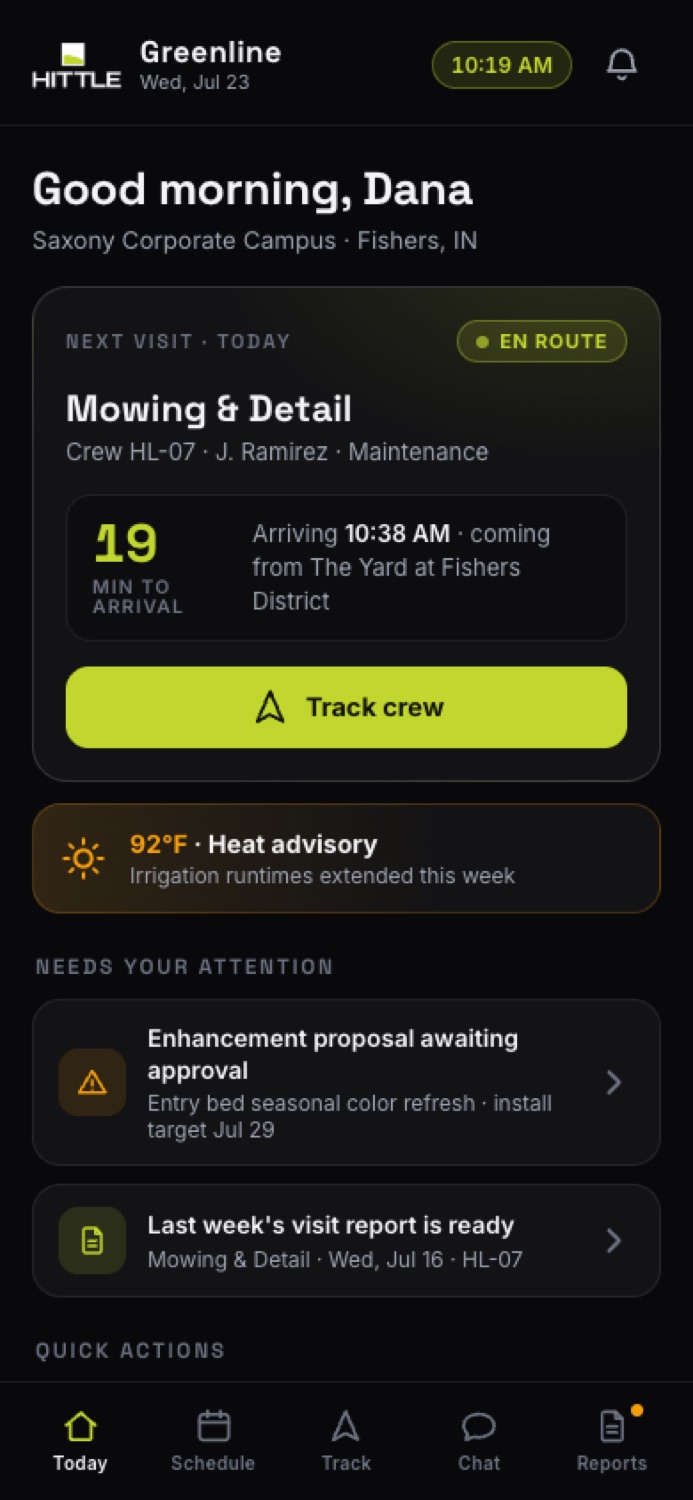
- IToday, at a glance. Next visit with a live ETA counting down, weather that affects the work, and anything waiting on the client's signature — one screen, zero phone tag.
- IISchedule they can trust. Three weeks of visits with scope details a tap away — mowing, irrigation, enhancements, fertilization — each tied to a named crew.
- IIILive crew tracking. Watch the truck come down US-31, get a notification at the gate, then follow the visit checklist item by item while the crew is on site.
- IVChat with the account team. A direct line to the account manager with AI-drafted replies the team reviews — plus quick actions for quotes, issues, and schedule changes.
- VReports & approvals. Photo-backed visit reports with time-on-site, and enhancement proposals the client can approve in one tap — straight onto the schedule.
- VIProduction pass. The real build adds per-client logins across whole portfolios, push notifications, e-sign on approvals, and a feed straight from Groundspeed — one system, two audiences.
One feed. Every audience.
Groundspeed and Greenline run on the same feed. The GPS ping that tells your ops team a crew is 40 minutes over estimate is the same ping that punches that crew in on site and tells your client the truck is 5 minutes out. Build the spine once — every audience gets its own view of the truth.
We invest in the teams we want to build with.
HoosAI is an Indiana software shop, and Hittle is the kind of company we built it for — fifty years of family operation, the biggest independent book of commercial grounds in the state, and an operations problem that software actually solves. We build working demos first because it's the honest way to sell: you judge the product, not the promise. If it's a fit, we co-brand the case study, you get a reference build your industry hasn't seen, and the specifics land in the walkthrough — no fine print.
We rebuilt the whole website too, and pointed it at the buyers Hittle actually serves: property managers, developers, general contractors and homebuilders. Commercial leads the navigation, the homepage and every call to action ("Request a commercial bid"). Residential is still there, one link deep. Same real photography, the same fifty-year story, every page the current site has.



- ICommercial first, everywhere. Bid Build, Maintenance and Production Homes lead the nav and the homepage, with the commercial bid form one tap away. Residential stays live but no longer sets the tone.
- IIEvery real page, not a landing page. 25 pages: commercial services, project gallery, bilingual careers, education center, and working bid and contact forms.
- IIIYour real work, not stock photos. 88 real project photos pulled from actual job sites, in a proper masonry gallery with a lightbox.
- IVForms that actually send. Commercial bid, builder bid, general contact and consultation forms, wired to real email delivery, live today.
- VBuilt mobile-first. Every page, form, and animation checked on a real 375px viewport before anything shipped.
Next steps
Forty-five minutes, your team and ours. We drive the demos, you poke holes, we map them to how your crews and clients actually work.
We agree on what the production build includes — GPS hardware, integrations, properties, users — and put it in writing.
HoosAI builds, you review live builds as they land — the same way you saw these — until your crews and clients are on it.